ESXi and Nutanix post configuration using PowerCLI
For years I’ve been using kickstart for the installation and configuration of VMware ESXi. Who doesn’t know William Lam kickstart blogs?
Using kickstart, I can do a fully unattended installation and configuration of ESXi.
But, when using an HCI solution like Nutanix, host are pre-installed (foundation) with VMware ESXi, and the Nutanix CVM runs (as a VM) on the hypervisor. So you don’t need to install ESXi separately.
If you want to use one script to configure VMware ESXi and the Nutanix CVM. Which includes configuring options like changing default passwords or adding a ESXi host to a VMware Distributed vSwitch, kickstart using esxcli and bash command, isn’t flexible enough anymore.
After a little digging around in different options, I decided to use PowerShell. This enables me to create an configuration script, where I can configure 98% of all the setting I want. This script can run on your laptop or on a management server.
The servers I used for this example have 4 vmnic’s. 2 x 10G (vmnic0 and vmnic1), 2 x 1G (vmnic2 and vmnic3) and 1 IPMI interface. The IPMI interface is shared with vmnic2.
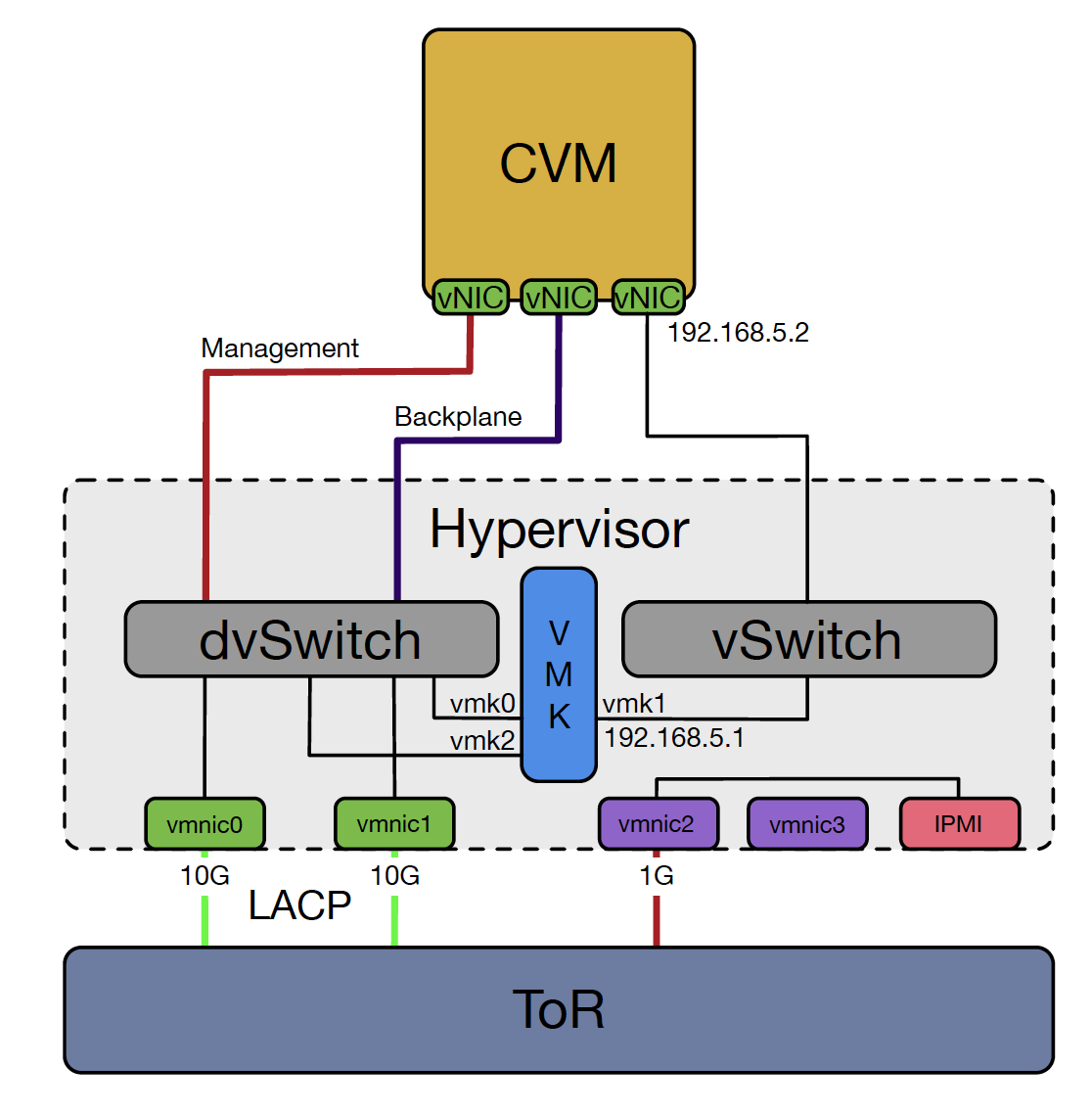
After the default ESXi installation, done by foundation, all vmnic’s are connected to vSwitch0 and vmk0 and vmk1 are also connected to vSwitch0. First, we migrate vmnic0 and vmnic1 to the DVS. When these are connected, and in this case, when LACP is up and running, vmk0 and vmk1 are migrated to the DVS.
For now, after the ESXi host is added to the DVS, the script is paused, and you have to add the vmnic’s to the DVUplinks manually. I haven’t had the time to find the right commands for this. I’ll add this in a updated version.
This script is using a configuration file config.ini where different options are set.
; configuration file for VMwareConfig.ps1
; version 1.0
; parameters are case sensitive!!!

[defaults]
ipv6=false
powerpolicy=balanced
reboot=true
esxipassword=nutanix/4u
subnetmask=255.255.254.0

[dns]
dns1=192.168.1.2
dns2=192.168.1.3
suffix=virtual-hike.com

[servers]
syslog=udp://syslog.virtual-hike.com:514
ntp=ntp.wilmsenit.nl
vcenter=vcenter.virtual-hike.com

[vcenter]
datacenter=DC1
cluster=CL01
dvs=DVS-DVS01
dvuplink1=vmnic0
dvuplink2=vmnic1
dvportgroupmgmt=Management
portgroupmgmt=Management Network
dvportgroupvmotion=vMotion
vmkvmotion=vmk2
As you want to configure multiple hosts in the same batch, the script will read a file called hosts.txt where every line represents the hostname of the ESXi host you want to configure. This can also be only one ESXi server.
And now, the code..
#requires -version 2
<#
.SYNOPSIS
  Configure VMware ESXi with Nutanix CVM
.DESCRIPTION
  Configure VMware ESXi with Nutanix CVM. Using .\hosts.txt for ESXi import and config.ini for configuration settings
.INPUTS
  file: hosts.txt
  file: config.ini
.OUTPUTS
  Log file stored in .\VMwareConfigLog.txt>
.NOTES
  Version:        1.1
  Author:         M. Wilmsen
  Creation Date:  1-10-2018
  Purpose/Change: Configure VMware ESXi with Nutanix CVM

.EXAMPLE
  VMwareConfig.ps1
#>
#---------------------------------------------------------[Initialisations]--------------------------------------------------------

Start-Transcript -Path ".\VMwareConfigLog.txt"
$iniFile = Get-IniFile .\config.ini
$username = "$env:USERNAME"+'@virtual-hike.internal'

#-----------------------------------------------------------[Functions]------------------------------------------------------------

function Get-IniFile
{
    param(
        [parameter(Mandatory = $true)] [string] $filePath
    )

    $anonymous = "NoSection"

    $ini = @{}
    switch -regex -file $filePath
    {
        "^\[(.+)\]$" # Section
        {
            $section = $matches[1]
            $ini[$section] = @{}
            $CommentCount = 0
        }

        "^(;.*)$" # Comment
        {
            if (!($section))
            {
                $section = $anonymous
                $ini[$section] = @{}
            }
            $value = $matches[1]
            $CommentCount = $CommentCount + 1
            $name = "Comment" + $CommentCount
            $ini[$section][$name] = $value
        }

        "(.+?)\s*=\s*(.*)" # Key
        {
            if (!($section))
            {
                $section = $anonymous
                $ini[$section] = @{}
            }
            $name,$value = $matches[1..2]
            $ini[$section][$name] = $value
        }
    }

    return $ini
}
#----------------------------------------------------------[Main]----------------------------------------------------------

#Get variables from config.ini
$dns1 = $iniFile.dns.dns1
$dns2 = $iniFile.dns.dns2
$suffix = $iniFile.dns.suffix
$syslog = $iniFile.servers.syslog
$ntp = $iniFile.servers.ntp
$ipv6 = $iniFile.defaults.ipv6
$powerpolicy = $iniFile.defaults.powerpolicy
$reboot = $iniFile.defaults.reboot
$subnetmask = $iniFile.defaults.subnetmask
$vcenter = $iniFile.servers.vcenter
$datacenter = $iniFile.vcenter.datacenter
$cluster = $iniFile.vcenter.cluster
$dvSwitch = $iniFile.vcenter.dvs
$ESXiPassword = $iniFile.defaults.esxipassword
$dvUplink1 = $iniFile.vcenter.dvuplink1
$dvUplink2 = $iniFile.vcenter.dvuplink2
$dvPortgroupMGMT = $iniFile.vcenter.dvportgroupmgmt
$portgroupMGMT = $iniFile.vcenter.portgroupmgmt
$dvportgroupVMotion = $iniFile.vcenter.dvportgroupvmotion
$sysloghostloglevel = $iniFile.servers.sysloghostloglevel
$syslogvpxaloglevel = $iniFile.servers.syslogvpxaloglevel

#List all setting
Write-Host "The following config will be used..."
Write-Host "************************************"
Write-Host "ESXi root password: " $ESXiPassword
Write-Host "vCenter username: " $username
Write-Host "vCenter server: " $vcenter
Write-Host "vCenter datacenter: " $datacenter
Write-Host "vCenter cluster: " $cluster
Write-Host "vCenter DVS: " $dvSwitch
Write-Host "dvUplink1: " $dvUplink1
Write-Host "dvUplink2: " $dvUplink2
Write-Host "dvPortgroup Management: " $dvPortgroupMGMT
Write-Host "Portgroup Management: " $portgroupMGMT
Write-Host "dvPortgroup vMotion: " $dvPortgroupVMotion
Write-Host "DNS servers: " $dns1"," $dns2
Write-host "DNS suffix: " $suffix
Write-Host "Syslog server: " $syslog
Write-Host "Syslog hostd loglevel: " $sysloghostloglevel
Write-Host "Syslog vpxa loglevel: " $syslogvpxaloglevel
write-host "NTP Server" $ntp
Write-Host "IPv6 enabled: " $ipv6
Write-Host "PowerPolicy: " $powerpolicy
Write-Host "Default Subnetmask :" $subnetmask
Write-Host "Reboot: "$reboot
Write-Host "************************************"

while( "y","Y","n","N" -notcontains $answer )
{
  $answer = Read-Host "Are these setting correct? [y/n]"
}

if ( $answer -eq "n" -or $answer -eq "N" ) {
  Write-Host "Please correct settings in config.ini"
  break
}

Write-Host "Oke, here we go!"
Write-Host ""

$hosts = "./hosts.txt"

Write-Host "Configuring the following ESXi host(s):" -ForegroundColor Yellow
Get-Content $hosts | ForEach-Object {
  Write-Host $_ -ForegroundColor Magenta
}

#Define vCenter Password
$Password = Read-Host "Enter your vCenter password" -AsSecureString
$VCPasswordDec = [Runtime.InteropServices.Marshal]::PtrToStringAuto([Runtime.InteropServices.Marshal]::SecureStringToBSTR($Password))

#Connect vCenter Server
#write-host $username $VCPasswordDec
Connect-VIServer $vcenter -User $username -Password $VCPasswordDec
Remove-Variable VCPasswordDec

$VIserverlist = $Global:DefaultVIServer
if ( $VIserverlist -eq $null )
{
  Write-host "No connection to vCenter server $vcenter. Exiting..."
  BREAK
}

Get-Content $hosts | ForEach-Object {
  $esxi = $_
  $fqdn = $esxi + "." + $suffix

  Write-Host "Configuring ESXi: " $fqdn -ForegroundColor Yellow

  #Check if ESXi server is accessible
  if ( Test-Connection -ComputerName $fqdn -Quiet ) {
    Write-Host "ESXi host response to ping"
    $PingESXi = $true
  }
  else {
    Write-Host "Cannot contact ESXi, skipping" -ForegroundColor Red

    $PingESXi = $false
  }

  if ( $PingESXi ) {

    Write-Host "Add ESXi $fqdn to vCenter: $vcenter ..." -ForegroundColor Magenta
    Add-VMHost $fqdn -Location (Get-Datacenter $datacenter | Get-Cluster $cluster) -User root -Password $ESXiPassword -RunAsync -force:$true
    Start-Sleep -s 20

    $vmhost = get-vmhost -Name $fqdn

    Write-Host "Configuring DNS..." -ForegroundColor Magenta
    $vmhost | Get-VMHostNetwork | Set-VMHostNetwork -DomainName $suffix -DNSAddress $dns1 , $dns2 -SearchDomain $suffix -Confirm:$False

    Write-Host "Configuring IPv6..." -ForegroundColor Magenta
    $vmhost | Get-VMHostNetwork | Set-VMHostNetwork -IPv6Enabled ([System.Convert]::ToBoolean($ipv6)) -Confirm:$False

    Write-Host "Configuring NTP..." -ForegroundColor Magenta
    Add-VMHostNTPServer -NtpServer $ntp -VMHost $fqdn -Confirm:$false
    Get-VMHostService -VMHost $fqdn | where{$_.Key -eq "ntpd"} | Set-VMHostService -policy "on" -Confirm:$false
    Get-VMHostService -VMHost $fqdn | where{$_.Key -eq "ntpd"} | Restart-VMHostService -Confirm:$false

    #Syslog
    Write-Host "Configuring syslog..." -ForegroundColor Magenta
    $hostlog="Config.HostAgent.log.level"
    $vpxalog="Vpx.Vpxa.config.log.level"
    Get-AdvancedSetting -Entity $vmhost -Name Syslog.global.logHost | Set-AdvancedSetting -Value $syslog -Confirm:$false
    Write-Host set $hostlog to info on ESXi $vmhost -foregroundcolor Magenta
    Get-AdvancedSetting -Entity $vmhost -name $hostlog |Set-AdvancedSetting -Value $sysloghostloglevel  -Confirm:$false
    write-host set $vpxalog to info on ESXi $esxi -foregroundcolor Magenta
    Get-AdvancedSetting -Entity $vmhost -name $vpxalog |Set-AdvancedSetting -Value $syslogvpxaloglevel  -Confirm:$false

    #Power Policy
    Write-Host "Configuring Power Policy..." -ForegroundColor Magenta
    $vmhostview = Get-View -ViewType Hostsystem -Filter @{"Name"=$($vmhost).Name} -Property ConfigManager.PowerSystem
    $powerpolicyconfig = Get-View $vmhostview.ConfigManager.PowerSystem
    switch ( $powerpolicy )
    {
      'High Performance'{ Write-Host "Configuring PowerPolicy to High Performance" -ForegroundColor Magenta; $powerpolicyconfig.ConfigurePowerPolicy(1) }
      'Balanced' { Write-Host "Configuring PowerPolicy to Balanced" -ForegroundColor Magenta; $powerpolicyconfig.ConfigurePowerPolicy(2) }
      'Low Power' { Write-Host "Configuring PowerPolicy to Low Power" -ForegroundColor Magenta; $powerpolicyconfig.ConfigurePowerPolicy(3) }
      'Custom' { Write-Host "Configuring PowerPolicy to Custom" -ForegroundColor Magenta; $powerpolicyconfig.ConfigurePowerPolicy(4) }
      default { Write-Host "No valid value of Power Policy: $powerpolicy" -ForegroundColor Red }
    }

    #Configuring Network
    Write-host "Add host $fqdn to dvSwitch $dvSwitch" -ForegroundColor Magenta
    Add-VDSwitchVMHost -VDSwitch $dvSwitch -VMhost $vmhost -Confirm:$false

    #Migrate VMNIC0 to DVS
    Write-Host "Migrate VMNIC0 to DVS $dvSwitch" -ForegroundColor Magenta
    $vmhostNetworkAdapter = Get-VMHost $vmhost | Get-VMHostNetworkAdapter -Physical -Name $dvUplink1.toUpper()
    Get-VDSwitch $dvSwitch | Add-VDSwitchPhysicalNetworkAdapter -VMHostNetworkAdapter $vmhostNetworkAdapter -confirm:$false
    Start-Sleep -s 10

    #Migrated VMNIC1 to DVS
    Write-Host "Add $dvUplink2 to DVS $dvSwitch" -ForegroundColor Magenta
    $vmhostNetworkAdapter = Get-VMHost $fqdn | Get-VMHostNetworkAdapter -Physical -Name $dvUplink2.toUpper()
    Get-VDSwitch $dvSwitch | Add-VDSwitchPhysicalNetworkAdapter -VMHostNetworkAdapter $vmhostNetworkAdapter -confirm:$false
    Start-Sleep -s 10

    Clear-variable -Name "answer"
    while( "y","Y","n","N" -notcontains $answer )
    {
      $answer = Read-Host "Continue? [y/n]"
    }

    if ( $answer -eq "n" -or $answer -eq "N" ) {
      Write-Host "Exiting"
      break
    }

    #Migrage Management vmk0 to DVS
    Write-Host "Migrate vmk0 (Management) to DVS $dvSwitch" -ForegroundColor Magenta
    $vmk = Get-VMHostNetworkAdapter -Name vmk0 -VMHost $vmhost
    Set-VMHostNetworkAdapter -Portgroup $dvPortgroupMGMT -VirtualNic $vmk -confirm:$false

    Clear-variable -Name "answer"
    while( "y","Y","n","N" -notcontains $answer )
    {
      $answer = Read-Host "Continue? [y/n]"
    }

    if ( $answer -eq "n" -or $answer -eq "N" ) {
      Write-Host "Exiting"
      break
    }

    #Migrate NTNX CVM to DVS
    $cvm = Get-VM -Name NTNX* -Location $vmhost
    $cvm | Get-NetworkAdapter |Where {$_.NetworkName -eq "VM Network" } |Set-NetworkAdapter -Portgroup $dvPortgroupMGMT -Confirm:$false
    Write-Host "Migrating Nutanix CVM $cvm to $dvSwitch..." -ForegroundColor Magenta
    $cvm | Get-NetworkAdapter |Where {$_.NetworkName -eq "Backplane Network" } |Set-NetworkAdapter -Portgroup "MGMT01-NTNXBackplane" -Confirm:$false

    #Add vMotion vmk
    $fqdnVMotion = $esxi + "vmt.grid.internal"
    $vmotionIP = [System.Net.Dns]::GetHostAddresses("$fqdnVMotion").IPAddressToString
    $dvs = Get-VDSwitch -Name $dvSwitch
    Write-Host "Adding VMotion vmk to $dvSwitch, dvPortgroup $dvportgroupVMotion with address: $vmotionIP / $subnetmask" -ForegroundColor Magenta
    New-VMHostNetworkAdapter -VMHost $vmhost -PortGroup $dvportgroupVMotion -VMotionEnabled $true -VirtualSwitch $dvs -IP $vmotionIP -SubnetMask $subnetmask

    #Remove Standard portgroups and vSwitches
    Write-Host "Remove virtual Switch vSwitch0 including portgroups"
    $vswitch = Get-VirtualSwitch -VMHost $vmhost -Name vSwitch0
    Write-Host "Removing vSwitch portgroup $portgroupMGMT ..." -ForegroundColor Magenta
    $mgmt_pg = Get-VirtualPortGroup -Name $portgroupMGMT -VirtualSwitch $vswitch
    Remove-VirtualPortGroup -VirtualPortGroup $mgmt_pg -confirm:$false
    Write-Host "Removing vSwitch portgroup VM Network..." -ForegroundColor Magenta
    $vm_pg = Get-VirtualPortGroup -Name "VM Network" -VirtualSwitch $vswitch
    Remove-VirtualPortGroup -VirtualPortGroup $vm_pg -confirm:$false
    Write-Host "Removing vSwitch portgroup Backplane Network ..." -ForegroundColor Magenta
    $bp_pg = Get-VirtualPortGroup -Name "Backplane Network" -VirtualSwitch $vswitch
    Remove-VirtualPortGroup -VirtualPortGroup $bp_pg -confirm:$false

    #Remove vSwitch0
    Write-Host "Removing standard vSwitch vSwitch0" -ForegroundColor Magenta
    Remove-VirtualSwitch -VirtualSwitch $vswitch -confirm:$false


    if ( [System.Convert]::ToBoolean($reboot) ) {
      #Shutdown Nutanix CVM in order to reboot ESXi host
      Write-Host "Shutdown Nutanix CVM..." -ForegroundColor Magenta

      $cvm | Shutdown-VMGuest -Confirm:$false
      Start-Sleep -s 60
      Write-Host "Restart ESXi..." -ForegroundColor Magenta
      $vmhost | Restart-VMHost -Force -Confirm:$false
    }

  }
}

Write-Host "Disconnect vCenter server $vcenter" -ForegroundColor Magenta
Disconnect-VIServer -Server $vcenter -Confirm:$false

Write-Host "Done!" -ForegroundColor Magenta
I used this script for a Nutanix cluster, but you can use it for every ESXi host. Just remove the Nutanix part from the script and you’re good to go!

Michael Wilmsen is a experienced VMware Architect with more than 20 years in the IT industry. Main focus is VMware vSphere, Horizon View and Hyper Converged with a deep interest into performance and architecture.
Michael is VCDX 210 certified, has been rewarded with the vExpert title from 2011, Nutanix Tech Champion and a Nutanix Platform Professional.
Tags: CVM, Kickstart, Nutanix, PowerShell, Vmware

